Freedom Font: Where Patriotism Meets Precision Design
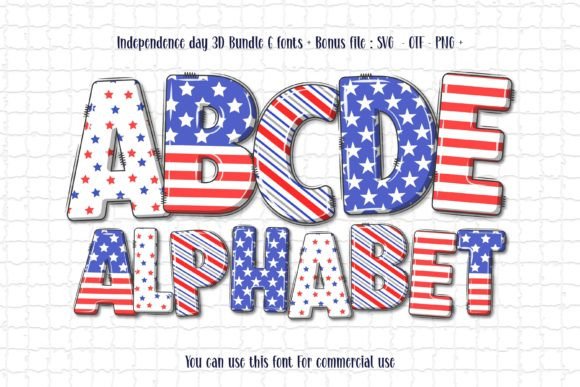
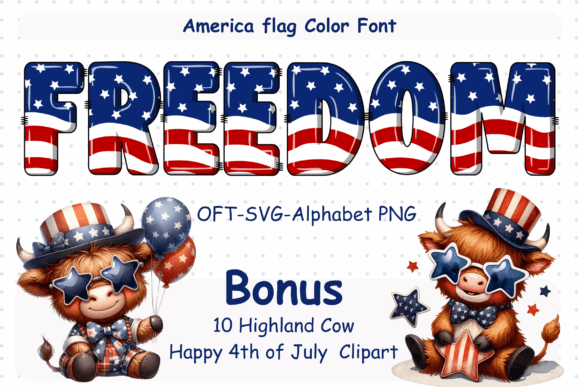
Imagine typing the word “liberty” — and watching each letter pulse with the bold red of Revolutionary banners, the crisp white of Declaration parchment, and the deep navy of star-spangled skies. That’s not a visual effect or layered graphic. That’s Freedom: a meticulously crafted font where every uppercase A, lowercase t, and punctuation mark is a deliberate, scalable embodiment of the American flag’s stars and stripes.
More Than Just a Typeface — It’s a Statement in Every Stroke
Freedom isn’t designed to sit quietly in the background. It’s built for impact — for signs that stop traffic, for T-shirts that spark conversations, for social media graphics that resonate deeper than a stock photo ever could. Each character integrates red, white, and blue *within its form*, not as an overlay or fill, but as structural elements: stripes flow along stems and crossbars; stars nestle into counters and terminals; even the dot on the lowercase “i” is a five-pointed star.
This isn’t novelty typography. It’s intentional symbolism — engineered so that whether you’re spelling “USA” across a parade float or “VOTE” on a campaign yard sign, the message carries weight *before* the reader processes the word itself. The design respects proportion, legibility, and typographic hierarchy — meaning it works at 12 pt on a business card *and* at 12 feet on a vinyl banner.
Two Versions, One Vision — Know Which Fits Your Workflow
Freedom comes in two distinct technical formats — and choosing the right one saves hours of frustration, especially if you're working across platforms like Cricut Design Space, Adobe Illustrator, or Silhouette Studio.
The Black Version: Your Go-To for Cutting Machines
The black version of Freedom is a clean, single-color outline font (OTF/TTF) — fully compatible with Cricut Design Space, Sure Cuts A Lot, ScanNCut, and most other cutting software. It cuts cleanly, layers predictably, and scales without distortion. Whether you’re creating iron-on transfers for Fourth of July cookouts, engraved wooden ornaments for veterans’ events, or stencils for patriotic murals, this version delivers consistent, production-ready results.
Pro tip: Use the black version when your project relies on physical materials — vinyl, cardstock, heat transfer, or wood. Its vector precision ensures sharp corners, smooth curves, and reliable cut lines every time.
The Color Version: Designed for Digital Depth and Creative Control
The color version unlocks expressive potential — but only in programs that support OpenType-SVG or multi-layer color fonts. Think Adobe Photoshop (with layer-based workflows), Illustrator (via Live Paint or compound paths), Silhouette Studio (with advanced fill tools), or Inkscape (using SVG editing). Here, each letter arrives pre-colored: red stripes, white gaps, navy fields, and precise gold-tinged stars — all editable, repositionable, and resizable without rasterization.
Important note: This version does not work in Cricut Design Space. Its OTF/SVG files contain embedded color data that Cricut’s engine cannot interpret — attempting to use it there will result in missing colors, flattened layers, or failed uploads. If you’re unsure which version suits your setup, refer to our Ultimate Font Guide for step-by-step compatibility checks and workflow diagrams.
Real Projects, Real Impact — How Designers Are Using Freedom Today
Freedom isn’t just for holiday specials. Its versatility shows up across industries and intentions:
- Small Business Branding: A local bakery in Maine uses Freedom for its “Patriot Pie” seasonal menu board — pairing the font with burlap textures and gingham accents. Customers photograph it, tag the shop, and the font becomes part of their brand recall.
- Educational Materials: History teachers print Freedom-based worksheets for Constitution Day — students trace letters while discussing the symbolism behind each stripe and star. The font transforms abstract ideals into tactile learning.
- Community Campaigns: A city council’s “Honor Our Veterans” initiative uses Freedom in digital ads, printed posters, and embroidered patches — ensuring visual consistency from Instagram stories to podium backdrops.
- Personal Keepsakes: Crafters laser-engrave Freedom onto walnut coasters with family names and service years — turning typography into heirloom objects rooted in shared values.
What to Consider Before You Download
Before adding Freedom to your library, ask yourself three practical questions:
- What’s my primary output method? If you cut, weed, and apply — go with the black version. If you composite, animate, or build layered digital assets — the color version gives you richer control.
- Which software am I using — and what’s its latest update status? Some older versions of Silhouette Studio or Inkscape may require manual SVG import steps. Check release notes or test with the free sample characters first.
- Do I need licensing for commercial use? Yes — Freedom includes both personal and commercial licenses. If you’re selling products featuring the font (e.g., mugs, apparel, digital templates), make sure your license tier covers your intended scale and distribution method.
Typography With Intention — Why Freedom Stands Apart
There are dozens of “American flag” fonts online. Most rely on clipart-style fills, pixelated stars, or forced distress effects that age poorly and lack typographic integrity. Freedom avoids those pitfalls by anchoring its design in real typographic principles: x-height consistency, balanced stroke contrast, open counters for readability, and optical adjustments for screen and print rendering.
It also respects context. You won’t find forced “retro” warping or exaggerated serifs that clash with modern layouts. Instead, Freedom offers subtle nods — like the way the uppercase “B” echoes the curve of a bald eagle’s wing, or how the ampersand (&) subtly incorporates thirteen interlocking stripes. These details reward closer looking without sacrificing clarity.
Getting Started — Fast, Flexible, and Fully Supported
Installation is straightforward: unzip, double-click the OTF or TTF file, and hit “Install.” On Windows, it lands in Fonts folder; on Mac, it appears in Font Book. Once installed, Freedom shows up in the font menu of any compatible app — no plugins or extensions required.
For designers who rely on cloud-based tools like Canva: Freedom works there too — but only via upload (not native library). Upload the black version for safe, universal use. Avoid uploading the color version unless you’ve confirmed Canva’s current SVG support — behavior can shift with platform updates.
If you hit a snag — say, a missing glyph in a specific program or unexpected spacing in a multi-line headline — our support team responds within 24 hours with tailored troubleshooting. We also offer ready-to-use templates (SVG, EPS, and PNG bundles) for common applications: Cricut projects, social banners, printable wall art, and editable presentation slides.
A Font That Grows With Your Purpose
Freedom doesn’t shout. It resonates. It doesn’t decorate — it declares. And because it’s built on scalable vector foundations and thoughtful color architecture, it adapts: from a tiny star icon in a mobile app header to a 20-foot mural on a downtown building façade.
Whether you’re launching a small-batch merchandise line, designing civic engagement materials, or simply want your next DIY project to carry more meaning than standard fonts allow — Freedom meets you where you are. Not as a gimmick. Not as a trend. But as a tool — precise, purposeful, and proudly made to honor what the flag represents, one letter at a time.